Iklan - Scroll untuk Melanjutkan
Baca artikel Popmama lainnya di IDN App
Cara Membuat Miniatur Action Figure dengan Prompt Gemini AI.png
gemini.google.com

Intinya sih...

  • Proses sederhana melalui situs resmi Gemini dengan upload foto dan prompt yang sesuai.

  • Login menggunakan akun Google, pilih foto, masukkan prompt, dan tunggu hasil edit selesai.

  • Unduh foto yang akan tersimpan otomatis ke perangkat setelah proses selesai.

Disclaimer: This summary was created using Artificial Intelligence (AI)

Tren membuat gambar miniatur action figure dengan wajah sendiri menggunakan teknologi kecerdasan buatan sedang menjadi viral di media sosial. Fenomena ini dimungkinkan berkat kemampuan Gemini AI dari Google yang dapat mengubah foto biasa menjadi action figure yang terlihat realistis dan profesional. Fitur Nano Banana dalam Gemini AI memungkinkan pengguna untuk mengedit foto sesuai keinginan dengan cara yang praktis dan mudah.

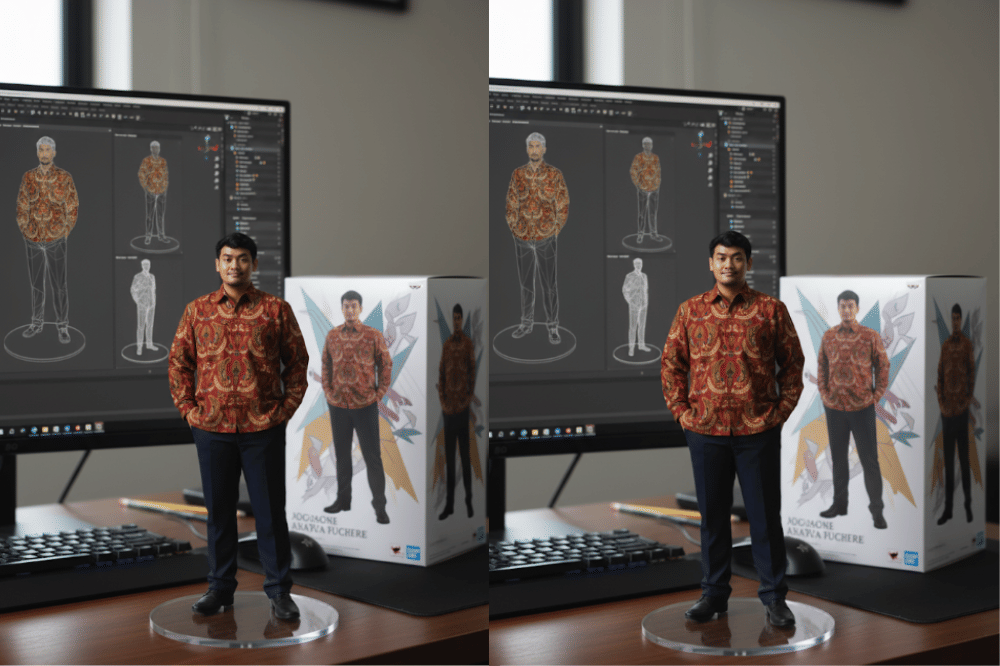
Proses pembuatan miniatur action figure ini melibatkan penggunaan prompt atau perintah khusus yang diberikan kepada AI setelah mengunggah foto. Dengan prompt yang tepat, Gemini AI dapat menghasilkan gambar action figure lengkap dengan detail packaging, base akrilik transparan, dan bahkan tampilan proses pembuatan 3D modeling di layar komputer.

Berikut Popmama.com merangkum cara membuat miniatur action figure dengan prompt Gemini AI miniatur action figure secara lebih detail. Yuk, disimak informasi selanjutnya!

1. Cara membuat miniatur action figure dengan Gemini AI

gemini.google.com

Membuat miniatur action figure di Gemini AI cukup sederhana. Proses ini dapat dilakukan langsung melalui situs resmi Gemini dan hanya membutuhkan foto serta prompt yang sesuai. Berikut panduannya:

  1. Masuk ke situs https://gemini.google.com.

  2. Login menggunakan akun Google.

  3. Klik tombol “+”, lalu pilih Upload Image.

  4. Pilih foto yang ingin diubah menjadi action figure pada perangkat.

  5. Setelah foto terunggah, masukkan prompt sesuai keinginan.

  6. Tekan ikon send (pesawat kertas) untuk memproses permintaan.

  7. Tunggu hingga hasil edit selesai, lalu periksa apakah sesuai dengan harapan.

  8. Jika sudah sesuai, unduh foto yang akan tersimpan otomatis ke perangkat.

Itulah cara untuk memanfaatkan Gemini AI dalam membuat miniatur action figure. Selanjutnya, ada contoh prompt dalam proses pembuatannya lho, Ma. Yuk, disimak informasi selanjutnya!

2. Contoh prompt miniatur action figure (Versi 1)

gemini.google.com

Penggunaan prompt yang tepat sangat penting agar hasil miniatur tampak realistis dan detail. Berikut dua contoh prompt populer yang banyak dibagikan oleh warganet:

  • Prompt 1:
    "Create a 1/7 scale commercialized figurine of the characters in the picture, in a realistic style, in a real environment. The figurine is placed on a computer desk. The figurine has a round transparent acrylic base, with no text on the base. The content on the computer screen is a 3D modeling process of the figurine. Next to the computer screen is a boy packaging box, designed in a style reminiscent of high-quality collectible figures, printed with original artwork. The packaging features two-dimensional flat illustrations."

  • Prompt 2:
    "Render a 1/7 scale, commercialized figurine of the pictured characters in a realistic, daylight office setting. The figurine is on a modern computer desk, standing on a round transparent acrylic base with zero text. On the screen, show the precise 3D modeling workflow of this figurine (CAD-style viewports, grid, measurement overlays). Beside the screen, place a high-end packaging box inspired by architectural presentation-clean typography grids, but no brand names-printed with original, two-dimensional blueprint-like flat illustrations of the characters. Scatter drafting tools, Pantone swatches, and a metal ruler on the desk. Soft natural light, crisp shadows, 35mm lens."

3. Contoh prompt miniatur action figure (Versi 2)

gemini.google.com

Selain itu, terdapat contoh prompt lain yang terinspirasi dari karya kreator di platform X maupun TikTok. Prompt berikut menekankan detail kemasan hingga proses pemodelan di layar komputer.

  • Prompt 3:
    "Create a 1/7 scale commercial figurine of the characters in the picture, in a realistic style, in a real environment. The figurine is placed on computer desk and features a round transparent acrylic base without any text. The content on the computer screen is the ZBrush modelling process of this figurine. Next to the computer screen is a BANDAI-style toy packaging box printed with the original artwork. The packaging features tow-dimensional flat illustrations. Ensure all elements maintain strict consistency with the reference image."

  • Prompt 4:
    "Use the nano-banana model to create a 1/7 scale commercialized figure of the character in the illustration, in realistix style and environment. Place the figure on a computer desk, using a circular transparent acrylix base without any text. On the computer screen display the ZBrush modeling process of the figure. Next to the computer screen, place a BANDAI-style toy packing box printed with the original artwork."

Nah, itulah penjelasan terkait cara membuat miniatur action figure dengan prompt Gemini AI miniatur action figure yang dapat dicoba. Semoga informasinya dapat bermanfaat ya, Ma.

Editorial Team